← Plugins
Örbital Tools

Dub Sequencer

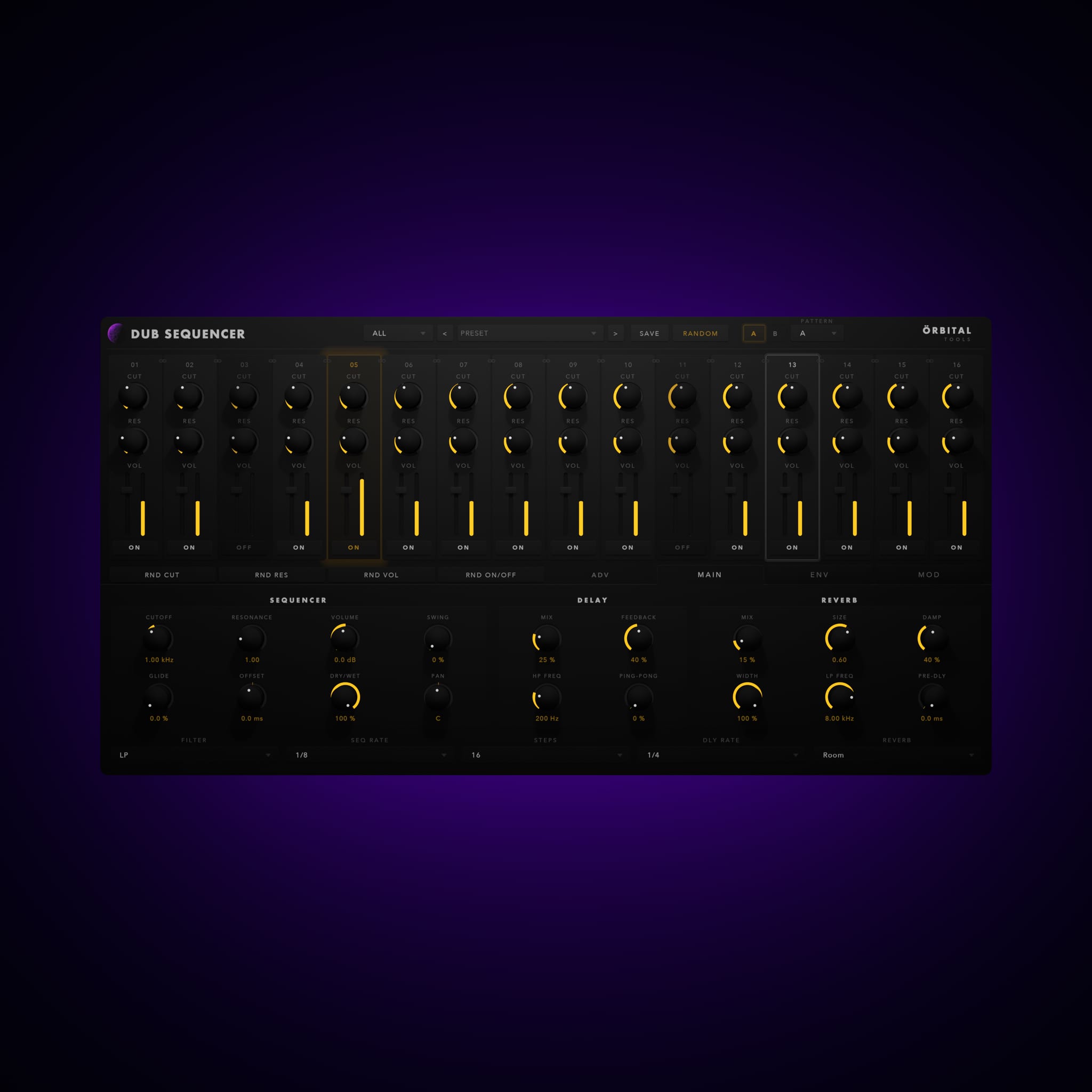
Dub Sequencer is an effect, not an instrument. Sixteen steps per bank, two banks, and a pattern that decides how they play — each step with its own cutoff, resonance, volume, pan, probability and envelope. Three LFOs and an envelope follower can drive any control in the plugin, including the ones inside the grid. Delay and five reverbs sit at the end, and you choose per step what goes into them. Put pads, chords, drums, top loops, bass or a whole bus through it; every kind of source gives you something different.

How it works

From idea to sound.

  1. 01

    Drop it on a channel with something sustained — a pad, a held chord — and press play. The sequencer runs on your DAW's transport.

  2. 02

    Load a preset from one of the six categories to hear what the plugin does, then start turning steps off. Leaving gaps builds a pattern faster than pulling volumes down.

  3. 03

    Set cutoff and resonance per step, and give the steps that matter an envelope. Chain steps together where you want one long sweep instead of sixteen short ones.

  4. 04

    Right-click any knob and assign it to an LFO. Start with cutoff on a slow synced LFO at two or four bars, so the filter moves over the section rather than within the bar.

  5. 05

    Right-click any knob and assign it to an LFO. Start with cutoff on a slow synced LFO at two or four bars, so the filter moves over the section rather than within the bar.

Built with intention

32 Steps, Two Banks

Sixteen steps per bank and a pattern that decides how the two play: A, AB, AAB, AABB, AAAB, ABBB. A figure can run over four bars instead of repeating every one. Chain steps together and they become one longer step, with the envelope stretched across the whole block.

An Envelope Per Step

Rise, fall and sustain on both volume and filter, set in percentages of the step so they hold their shape at any tempo. Drag the nodes in the graph to bend a segment into a curve. Filter depth is in octaves, so a sweep stays musical instead of arbitrary.

Modulate Anything

Three LFOs, free in hertz or locked to your DAW from an eighth note to sixteen bars, with six shapes including sample and hold. Right-click any knob or fader — including the ones inside the step grid — and hand it to an LFO. A ring around the control shows the range and where the LFO is right now.

Envelope Follower

A fourth modulation source driven by what comes in rather than a clock. Two-sided: it can open its targets as the input gets louder, or duck them. Percussive material drives it hardest, which makes it the fastest way to get a pattern moving with the track instead of against it.

Dub Delay

Ping-pong delay locked to your DAW from 1/32 to a bar, with a high pass inside the feedback loop so repeats come back thinner and recede instead of piling up. Switch the send on for one step and leave the rest dry — the dub move, without automation lanes.

Five Reverbs

Room, Plate, Hall, Spring and Chamber. The type shifts decay, damping, width and bandwidth around whatever the knobs are set to. Spring runs the send through a chain of allpass filters for the smear you would expect from a real one.
Installation

Set up and start.

  1. Run the installer and choose the formats you need: VST3, Audio Unit, or both.
  2. On macOS the VST3 goes to /Library/Audio/Plug-Ins/VST3 and the Audio Unit to /Library/Audio/Plug-Ins/Components. On Windows the VST3 goes to C:\Program Files\Common Files\VST3.
  3. Restart your DAW, or make it rescan its plugin folders.
  4. Open the plugin and enter the email address and licence key from your order confirmation. You can also find them in your account.

System requirements

  • macOS 11 Big Sur or later — Intel and Apple Silicon (universal)
  • Windows 10 or later, 64-bit
  • VST3 or Audio Unit host — all major DAWs
  • Internet connection for activation and a monthly check; works offline in between
Cart

Your cart is empty.